9 Best Free AI Video Generators for Beginners in 2026
A simple, up-to-date comparison of free AI video tools for YouTube Shorts, TikTok, Instagram Reels and other content, with tips to choose the right one.
Updated: November 5, 2026 · Published: August 10, 2026 · By Ghulam Mustafa Janjua
AI video generation has become much easier for beginners. You no longer need expensive cameras, editing experience or a production team. You can type a short description, upload an image or paste a script, and an AI tool creates a video clip for you.
A lot also changed in 2026. OpenAI shut down Sora, several new video models became available, and free plans changed. This guide has been updated with the best free and free-to-try AI video generators that beginners can use right now.
- Easiest for beginners: CapCut
- Best free AI video quality: Kling AI
- Best cinematic quality (paid): Google Veo
- Best for daily free practice: Dreamina
- Safest for commercial use: Adobe Firefly
Quick Comparison
| Tool | Free Access | Best For | Beginner Level |
|---|---|---|---|
| CapCut | Free editing + AI tools | Shorts, Reels and editing | Very Easy |
| Kling AI | Free credits that refresh | Realistic AI clips | Easy |
| Google Veo | Limited, mostly paid plans | Cinematic video with sound | Easy |
| Hailuo (MiniMax) | Free credits | Expressive movement | Easy |
| Pika | Monthly free credits | Fun social clips | Very Easy |
| Dreamina (Seedance) | Free daily credits | Daily practice | Easy |
| Luma Dream Machine | Small free allowance | Smooth camera moves | Easy |
| Runway | One-time free credits | Editing and pro workflow | Medium |
| Adobe Firefly | Limited free generations | Commercial-friendly content | Easy |
Note: Free plans change often. Most free AI videos have a watermark and limits on length, quality or commercial use. Always check each tool's official pricing page.
1. CapCut: Easiest for Beginners
CapCut is one of the easiest options because AI tools and normal video editing are in the same app. You can start from a topic, script or image, then add captions, voiceover, music and effects in one place. It is a favorite for TikTok, Reels and YouTube Shorts.
- Simple interface for new creators
- Automatic captions and AI editing tools
- Works on mobile and computer
- Perfect for finishing clips made in other AI tools
AI features can vary by country and account, so check what is available in your own CapCut app.
2. Kling AI: Best Free Video Quality
Kling AI creates realistic human movement and supports both text-to-video and image-to-video. Its free credits refresh regularly, which makes it one of the best tools for beginners who want to practice without paying. Many former Sora users moved to Kling in 2026.
Kling is made by Kuaishou, a China-based company, so read the privacy policy before uploading personal or client photos.
3. Google Veo: Best Cinematic Quality
Google's Veo models are known for cinematic visuals and built-in sound. You can access Veo mainly through the Gemini app and Google's paid AI plans. Free access is limited and can depend on your country, so it is best for creators who are ready to pay for top quality.
My Experience: Veo Inside Google Flow
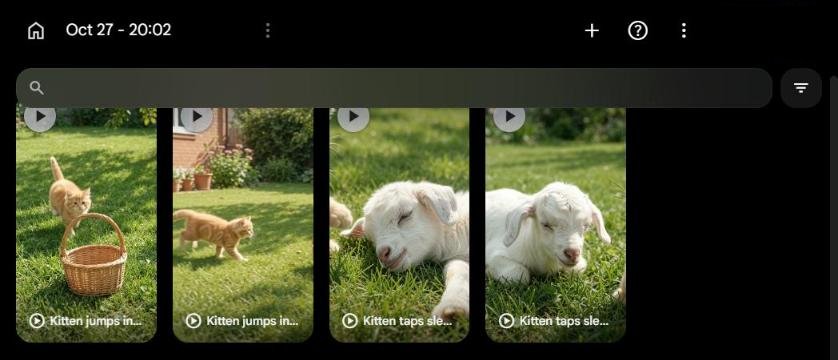
Google Flow, which runs on Google's Veo models, is the AI video tool I use most. I make the clips for my YouTube channel, MJ Pets Shorts, with it. I use it on a paid Google AI Pro plan, so for me it is not a free tool.
4. Hailuo (MiniMax): Best for Expressive Motion
Hailuo is popular for lively, expressive characters and viral-style short clips. It gives free credits to new users and has affordable paid plans.
5. Pika: Best for Fun Social Media Clips
Pika is very simple and includes creative effects that work well for social media. The free plan gives a monthly allowance of credits. It is a good pick for playful clips rather than movie-like scenes.
6. Dreamina (Seedance): Best for Daily Practice
Dreamina is ByteDance's creative platform (the company behind TikTok and CapCut) and gives access to its Seedance video models. Free daily credits make it great for learning a little every day.
7. Luma Dream Machine: Best Camera Movement
Luma is known for smooth camera movement and fast results. It works well for product shots, scenery and cinematic moments. The free allowance is small, so use it to test your prompts.
8. Runway: Best for Editing and Pro Workflow
Runway combines AI video generation with powerful editing tools to change, extend and polish clips. Its free plan gives a limited one-time credit allowance, so it is best for testing before you upgrade.
9. Adobe Firefly: Best for Commercial Use
Adobe Firefly offers AI video together with image and audio tools, and Adobe designs Firefly to be suitable for commercial projects. The free tier has limited generations. It is a good option if you create content for clients or already use Adobe products.
Which AI Video Generator Should You Choose?
- Complete beginner? Start with CapCut.
- Want the most free practice? Use Kling AI and Dreamina together.
- Making YouTube Shorts? Create clips in Kling or Pika, then finish them in CapCut.
- Making videos for clients? Consider Adobe Firefly or a paid plan without watermarks.
- Want the best quality and have a budget? Try Google Veo.
Looking for a direct replacement for Sora? Read our guide: 7 Best Free Sora Alternatives in 2026.
How to Make Your First AI Video
- Choose a topic. Start with one simple idea.
- Write a short prompt. Describe the subject, action, location and camera style.
- Generate the clip. Create a few versions.
- Review the result. Look for strange motion, changing faces or unwanted objects.
- Edit the best version. Add captions, voiceover, music and a strong opening hook.
- Export vertically. Use 9:16 for Shorts, TikTok and Reels.
For a full walkthrough, see How to Create AI Videos from Text. For voiceovers, see our best free AI voice generators.
Example AI Video Prompt
A tiny playful golden retriever puppy discovers a small red ball in a bright living room, sniffs it curiously, gently pushes it with one paw, then excitedly runs after it. Natural daylight, realistic smartphone video style, smooth natural movement, vertical composition.
Tips for Better AI Videos
- Keep prompts clear instead of extremely long.
- Describe one main action per short clip.
- Use reference images when character consistency matters.
- Test the same prompt in two tools and keep the better result.
- Add captions, because many viewers watch without sound.
- Save your prompts and project files on your own computer.
Are Free AI Video Generators Really Free?
"Free" usually means limited. Some tools give daily or monthly credits, some give a one-time allowance, and most add a watermark. Free videos may also wait in a queue at busy times. That is enough for learning and personal projects, but for client work you will often need a paid plan.
Worth Paying for Later: OpenArt
OpenArt is not on our free list, but many readers ask about it. It is a hub that puts many of the strongest video models in one place, including Kling, Google Veo, Seedance, Hailuo and Wan, so you can try the same prompt on different models without opening many accounts.
The catch: its free trial is very small. In October 2026 new accounts get about 40 one-time credits that expire after 7 days, while a standard 5-second video costs around 100 credits. In practice, you cannot make a full video for free. Paid plans start at about $14 per month without a watermark, and commercial use rights start from the higher Plus plan.
Our advice: learn first with the free tools above. Consider OpenArt only when you make videos regularly and want access to several premium models from one account. I use OpenArt myself, next to Google Flow, for some of my pet Shorts clips. Always check OpenArt's current pricing before you pay.
Can You Earn Money with AI Videos on YouTube?
Yes, but follow the rules. On July 15, 2025, YouTube renamed its "repetitious content" policy to "inauthentic content", and in July 2026 it clarified the policy further: generic, repetitive or template-based videos, distressing "off-putting" videos, and AI personas discussing sensitive topics such as health or finance cannot earn money. Use AI to support your own ideas, research, storytelling or commentary. Read the latest updates on our AI News page and our YouTube Shorts with AI guide.
The numbers are also high. To join the YouTube Partner Program with Shorts you need 1,000 subscribers and 10 million qualified Shorts views in 90 days. YouTube also says that from February 1, 2027, a channel must still have at least 10 million qualified Shorts views in the last 90 days to earn from Shorts ads for each month. See every way to earn, including options that work before you reach those numbers, in how to make money with AI YouTube Shorts.
Final Recommendation
Start with CapCut for easy editing and Kling AI or Dreamina for free AI clips. Test a few tools with the same prompt, and only pay when the free limits start slowing down your real work. Focus on videos that give viewers real value, and the tools will simply help you work faster.
Making vertical videos for YouTube? See the best free AI YouTube Shorts makers (with a watermark check).
Frequently Asked Questions
What is the easiest free AI video generator for beginners?
CapCut is the easiest starting option because it combines AI features with simple editing, captions, audio and export tools in one app.
Which free AI video generator has the best quality?
Among tools with useful free plans, Kling AI is one of the strongest in 2026. Google Veo is often rated higher for cinematic quality, but free access to it is limited.
Is there a free AI video generator without a watermark?
Most free AI video generators add a watermark. Paid plans usually remove it. Check each tool's export settings and pricing page, because this can change.
Can I create YouTube Shorts with AI?
Yes. AI tools can help with clips, scripts, voiceovers, captions and editing. Your final video should still provide original value, because YouTube does not monetize repetitive mass-produced content.
Is Sora still available?
No. OpenAI closed the Sora app in April 2026 and the Sora API in September 2026. Kling AI, Google Veo and Hailuo are popular alternatives.
Turn AI Video Skills into Income
Learn how beginners offer AI-powered video and design services on Fiverr.
Earn Money on Fiverr with AI