Published: November 2, 2026 · By Ghulam Mustafa Janjua
People often search for a "free alternative" to OpenShorts or Short AI. The names sound alike, but the tools are quite different. OpenShorts cuts a long video into short clips. Short AI is mainly for faceless story videos, the kind with an AI voice, captions and background footage.
How this guide was made: I opened both official websites and their pricing pages on 2 November 2026 and took the screenshots below. I have not paid for either tool, so I do not judge their output quality here. Where I talk about faceless Shorts, I use my own experience from my YouTube channel, MJ Pets Shorts. Prices and free limits change often, so check the official page before you pay.
Quick Answer: What Is Free?
| Tool | Main job | Free option (checked 2 Nov 2026) |
|---|---|---|
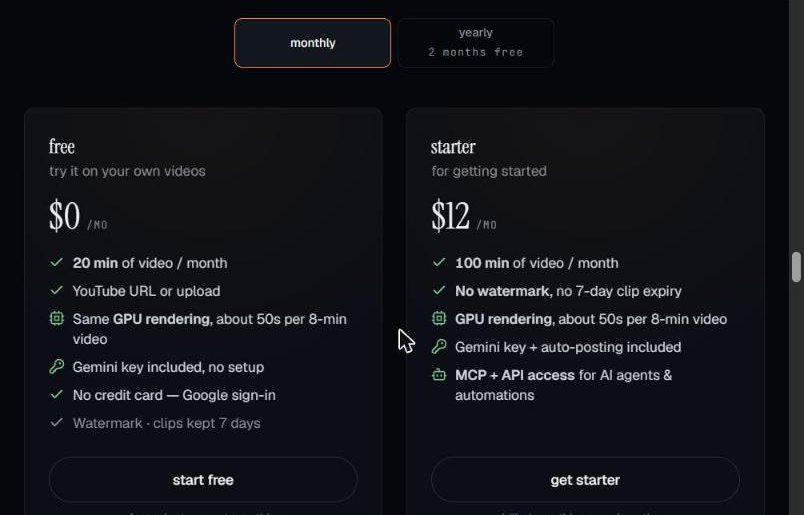
| OpenShorts (cloud) | Long video to short clips | First video free (up to 60 min), then 20 min a month. Watermark, clips kept 7 days. Paid from $12/month. |
| OpenShorts (self-hosted) | Same, on your own computer | Free open-source software, but needs Docker, 8 GB+ RAM and your own API keys |
| Short AI | Faceless story videos, plus a clip maker | No free plan on the pricing page. Basic is $19/month for 1,600 credits. |
| 2short.ai | Long YouTube video to clips | Free Starter plan with 30 minutes of AI analysis a month |
| YouTube "Edit into a Short" | Your own long video to one Short | Free, no watermark, you choose the part yourself |
| CapCut | Editing, captions, text-to-speech, long video to Shorts | Free plan, some Pro features and assets are paid |
What Is OpenShorts?
OpenShorts is an open-source AI clip generator. You give it a long video, such as a podcast, interview, stream or YouTube video, and it picks 3 to 15 moments that could work as Shorts. It then turns them into vertical 9:16 clips, keeps the speaker's face in the frame and adds word-by-word captions. It uses Google's Gemini AI to choose the moments.
There are two ways to use it:
- Cloud (openshorts.app): nothing to install. Your first video is free up to 60 minutes, then you get 20 free minutes every month. Free clips have a watermark and are kept for 7 days. The Starter plan is $12 a month for 100 minutes without a watermark.
- Self-hosted: the code is on GitHub under the MIT licence and is free to run. But you need Docker, a computer with at least 8 GB of RAM, and your own API keys (for example a Gemini key). Extras such as AI dubbing use ElevenLabs and fal.ai, which are paid by use. On a normal computer an 8-minute video takes about 5 to 8 minutes to process.
Who it suits: people who already have long videos with someone talking. For a complete beginner, the cloud version is the easy choice. The self-hosted version is for people who are comfortable with a terminal and Docker.
What Is Short AI?
Short AI (short.ai) is built mainly for faceless videos. It can make AI story videos, Reddit-style stories, "fake text" chat videos and dialogue videos, and it writes the script for you. It also has an auto-caption tool, an auto clip tool for long videos and scheduled posting to TikTok, YouTube, Instagram and Facebook.
It works with credits. On the pricing page, an AI story video costs 20 credits for every 30 seconds, auto captions cost 30 credits per minute, and auto clip costs 20 credits per minute.
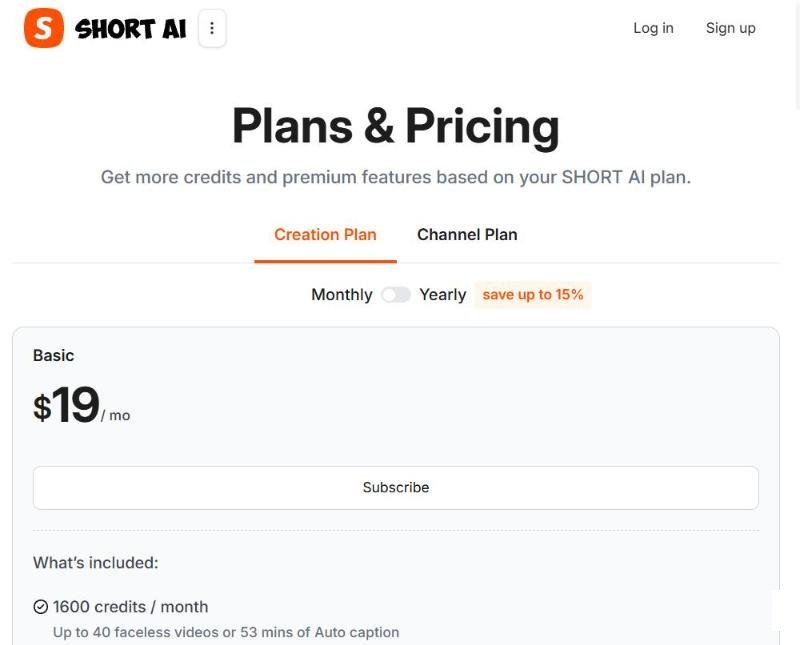
Is Short AI free? The homepage invites you to start for free, but the pricing page I checked showed only paid plans. So do not expect unlimited free videos. Create an account only after checking what the free trial includes at that moment.
Do not confuse it with 2short.ai. 2short.ai is a different tool that turns long YouTube videos into clips. It has a free Starter plan with 30 minutes of AI video analysis a month, and paid plans from $9.90 a month. It needs videos with captions, and its supported language list does not include Urdu or Hindi.
Free Alternatives if You Want OpenShorts-Style Clips
If your goal is to turn a long video into Shorts, these are the easiest free options:
- YouTube "Edit into a Short": free and without a watermark. It works on public long videos that you uploaded yourself. You choose up to 60 seconds; the AI does not pick the moment for you.
- CapCut: its long-video-to-Shorts tool lets AI find highlights, reframe them to 9:16 and add captions on the free plan. Check the preview for any Pro badge before you export.
- OpenShorts cloud free plan: if you only need a few clips a month, the 20 free minutes may be enough. Just remember the watermark.
- 2short.ai Starter: 30 free minutes of analysis a month, for English and other supported languages.
For step-by-step instructions, read How to Turn a Long Video into YouTube Shorts with AI.
Free Alternatives if You Want Short AI-Style Faceless Videos
You can make faceless Shorts without a Short AI subscription by combining a few tools. It takes more manual work, but the core tools have free plans:
- Idea and script: ChatGPT (free plan). Ask for 5 short story ideas, then a 30-second script for the best one.
- Voice: CapCut's text-to-speech (CapCut says the core feature is free) or the free plan of ElevenLabs, which has a monthly limit.
- Visuals: stock clips and templates in CapCut or Canva's free plan.
- Editing and captions: CapCut's auto captions, then export in vertical 9:16.
My Experience: Faceless Shorts Without Short AI
I make the Shorts for my channel, MJ Pets Shorts, without Short AI. I use ChatGPT or Claude for the idea and prompt, Google Flow or OpenArt for the video clips, ElevenLabs for the voice, and CapCut and Canva for editing. One Short takes me about 30 minutes.
To be honest: my setup is not completely free, because I pay for Google Flow to get better AI video clips. But the idea, script, voice and editing steps can all be started on free plans. My full process is in How to Make YouTube Shorts with AI.
Which One Should You Choose?
- You have long videos on your own channel: start with YouTube's Edit into a Short. It costs nothing and leaves no watermark.
- You want AI to find the best moments: try CapCut first, then the OpenShorts free cloud plan.
- You are technical and want unlimited clipping: self-host OpenShorts.
- You want faceless story videos: try the free ChatGPT + CapCut workflow first. Pay for Short AI only if you need many videos every week and the credits make sense for you.
Before You Use Any of These Tools
- Read the free limits. Watermarks, monthly minutes and clip expiry dates are the usual catch.
- Do not hide a watermark by cropping or blurring it. Use a no-watermark option or a paid plan instead.
- Only clip videos you own or have permission to use. Reuploading other people's content can lead to copyright claims.
- Add your own value. YouTube does not pay for mass-produced, repetitive videos. Read How to Make Money with AI YouTube Shorts for the current rules.
Related AI Guides
- How to Turn a Long Video into YouTube Shorts with AI (Free)
- How to Make Faceless YouTube Shorts with AI for Free
- Best Free AI YouTube Shorts Makers
- Best Free AI Voice Generators
Frequently Asked Questions
Is OpenShorts really free?
Yes, in two ways. The self-hosted version is free open-source software, but you need Docker, a computer with 8 GB or more of RAM and your own API keys. The cloud version at openshorts.app gives your first video free (up to 60 minutes), then 20 free minutes a month with a watermark. Paid plans start at $12 a month.
Does Short AI have a free plan?
Its homepage invites you to start for free, but when I checked the pricing page on 2 November 2026 it listed only paid plans, starting with Basic at $19 a month for 1,600 credits. Check the current offer before you sign up.
Are Short AI and 2short.ai the same tool?
No. Short AI (short.ai) mainly makes faceless story videos and also has a clip maker. 2short.ai is a separate tool that turns long YouTube videos into short clips, with a free Starter plan.
What is the best free alternative for turning a long video into Shorts?
If the long video is on your own YouTube channel, YouTube's Edit into a Short is free and has no watermark. If you want AI to find the best moments, try CapCut or the free OpenShorts cloud plan.
Can I make faceless Shorts without paying for Short AI?
Yes. You can write the script with ChatGPT's free plan, make the voice with CapCut's free text-to-speech, and edit and add captions in CapCut or Canva. The result needs more manual work, but the core tools are free.
Final Thoughts
OpenShorts is a strong choice for clipping long videos, and its free cloud plan is enough to test it. Short AI is a paid tool for faceless story videos. For most beginners, free tools such as YouTube's Edit into a Short, CapCut and ChatGPT can do the same jobs with a little more effort. Start free, learn what you really need, and only then decide whether a paid plan is worth it.