12 Best Free AI Tools for Freelancers in 2026
The free AI tools that help freelancers write proposals, design, edit videos, translate, organise work and deliver faster, without paying for expensive software.
Published: October 13, 2026 · Updated: November 11, 2026 · By Ghulam Mustafa Janjua
As a freelancer, your time is your income. Every hour spent on emails, rewriting proposals or fixing small design details is an hour you are not paid for. In 2026, free AI tools can take over much of this routine work, so you can deliver faster and take on more clients.
This guide lists the most useful free (or free-to-start) AI tools for freelancers, grouped by the job they do. You do not need all of them. Pick the few that match your service.
- ChatGPT or Gemini for writing, ideas and client messages
- Canva for designs, gig images and portfolios
- Grammarly to make every message look professional
- CapCut if you offer any kind of video work
Quick Comparison
| Tool | Best for | Free access |
|---|---|---|
| ChatGPT | Writing, proposals, ideas | Free plan with limits |
| Gemini | Google Docs and Gmail users | Free plan with limits |
| Claude | Long documents and careful writing | Free plan with limits |
| Uma (Upwork) | Upwork proposals | Included for Upwork freelancers, with limits |
| Canva | Design and portfolios | Free plan + limited AI uses |
| CapCut | Short video editing | Free editing + AI tools |
| Adobe Firefly | Commercial-friendly images | Limited free generations |
| Grammarly | Grammar and tone | Free plan |
| DeepL | Translation | Free plan with limits |
| Otter | Meeting notes | Free plan with limits |
| Notion | Organising projects | Free plan (AI features vary) |
| ElevenLabs | AI voiceovers | Free plan with limits |
Note: Free plans, limits and features change often and can vary by country. Always check each tool's official pricing page, and read the terms before using free output in paid client work.
AI Assistants for Writing and Client Communication
1. ChatGPT
ChatGPT is the most popular all-round assistant for freelancers. Use it to draft proposals, reply to client messages, create content outlines, brainstorm gig ideas and explain unfamiliar topics. Always edit the result so it sounds like you and matches the client's exact request. Get better results with our 50+ free ChatGPT prompts.
2. Gemini
Gemini is Google's assistant. It is especially useful if you work in Gmail, Google Docs and Google Drive every day. See how it compares in our ChatGPT vs Gemini 2026 guide.
3. Claude
Claude, made by Anthropic, is a strong option for reading long documents, such as client briefs or contracts, and for careful, well-structured writing. Like the others, the free plan has usage limits.
Tools for Winning Clients
4. Uma on Upwork
Upwork's built-in AI assistant, Uma, helps freelancers draft proposals and organise information inside Upwork. It is available to freelancers with usage limits. Use it to create a first draft, then personalise every proposal. Clients quickly ignore proposals that look copied.
Selling on Fiverr instead? Read How to Earn Money on Fiverr with AI.
Design, Video and Images
5. Canva
Canva is the easiest way to create social media posts, thumbnails, gig images, presentations and a simple portfolio. The free plan includes templates and a limited monthly allowance of AI features. Learn more in How to Use Canva AI for Free.
6. CapCut
CapCut is a favourite for short video editing, with auto-captions and AI tools. It is perfect for freelancers offering Reels, TikTok and YouTube Shorts editing. For more video tools, see 9 Best Free AI Video Generators.
7. Adobe Firefly
Adobe Firefly creates AI images, and Adobe designs it to be suitable for commercial projects, which matters when you deliver work to paying clients. The free tier offers a limited number of generations.
Writing Quality and Languages
8. Grammarly
Grammarly checks grammar, spelling and clarity as you type in your browser. For freelancers whose first language is not English, it is one of the simplest ways to make proposals and messages look more professional.
9. DeepL
DeepL is known for natural-sounding translations. It is useful for freelancers who work with clients in different countries or offer translation as a service. Always have important translations checked by someone who speaks the language well.
Organisation and Productivity
10. Otter
Otter records and transcribes meetings and creates summaries with action items, so you never miss a client request. Always tell clients when you record a call.
11. Notion
Notion helps you organise projects, client notes, invoices and checklists in one place. AI features are available in Notion, but what is included for free can change, so check your plan.
Audio
12. ElevenLabs
ElevenLabs creates natural AI voiceovers for videos, tutorials and ads. The free plan has limits and may not allow commercial use, so upgrade if you sell voiceovers to clients. See more options in our best free AI voice generators guide.
How to Use AI as a Freelancer, the Right Way
- Use AI for first drafts, not final work. Always review, edit and add your own expertise.
- Check facts and numbers. AI tools can make mistakes.
- Protect client data. Do not paste private or confidential client information into free AI tools unless the client agrees.
- Be honest. If a client asks whether you use AI, explain how you use it and how you check the work.
- Respect licences. Free plans sometimes limit commercial use or add watermarks.
My Real Test: Turning My Own Skill into a Fiverr Gig
I have not sold anything on Fiverr yet, so I will not pretend I have. But I do have one real skill: I make funny pet Shorts with AI tools for my channel, MJ Pets Shorts. On 11 November 2026 I tested how a free AI tool would help a beginner like me turn that skill into a gig. I gave the free plan of ChatGPT this exact prompt:
"Write a Fiverr gig title (max 80 characters) and a 3-sentence gig description for a beginner who makes funny AI pet videos for YouTube Shorts."
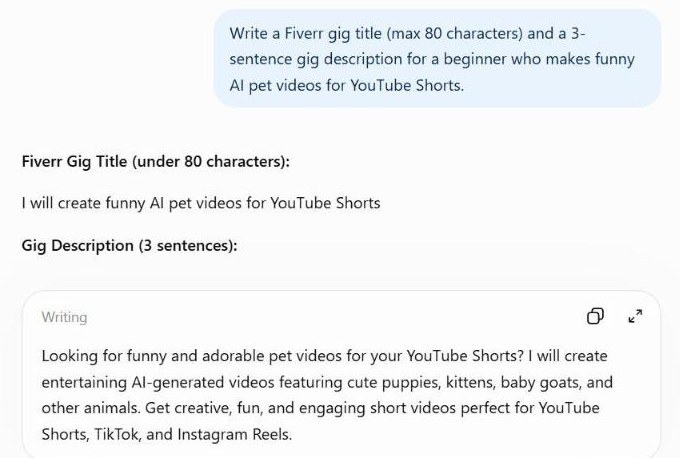
The draft was a good start, but I would not post it as it is. It does not say how long each video is, how many videos the buyer gets, how many revisions are included, or how fast I deliver. A buyer needs those details before ordering, and only I can add them honestly.
I also checked what I would really keep from a sale. I put a $50 order into our free Fiverr Fee Calculator, with no withdrawal or currency fee:
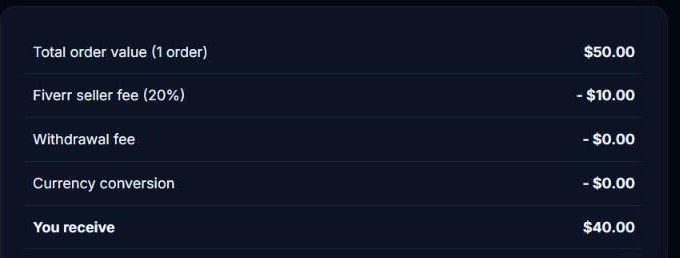
My lesson: AI saves time on the first draft, but your price and your gig details must come from you. Plan your price knowing that 20% goes to Fiverr.
Which Tools Do You Actually Need?
- Writers: ChatGPT or Claude + Grammarly
- Designers: Canva + Adobe Firefly
- Video editors: CapCut + ElevenLabs
- Virtual assistants: Gemini + Otter + Notion
- Translators: DeepL + Grammarly
Just starting out? Read our guides for Pakistan and the UAE, and learn how to avoid fake job offers.
Frequently Asked Questions
What is the best free AI tool for freelancers?
For most freelancers, a general assistant such as ChatGPT or Gemini is the most useful starting point, because it helps with proposals, messages and content. Add Canva if you do any design work.
Can I use AI-generated work for paying clients?
Often yes, but check each tool's terms, because some free plans limit commercial use. Always review and improve AI output, and be honest if a client asks how you work.
Do Fiverr and Upwork allow AI tools?
Both platforms allow freelancers to use AI tools, and Upwork even offers its own assistant. Read each platform's current rules, deliver original, high-quality work and never misrepresent what you deliver.
Do I need to pay for AI tools to start freelancing?
No. Free plans are enough to learn and get your first clients. Upgrade only when a tool clearly saves you paid working time.
Can AI replace freelancers?
AI can do simple tasks quickly, but clients still pay for judgment, communication, quality and reliability. Freelancers who use AI well usually become faster and more competitive.
Final Recommendation
Start small. Choose one AI assistant, one tool for your main service, and Grammarly for professional communication. Learn them well, use them to work faster, and spend the time you save on finding clients and improving quality. That combination is what helps freelancers grow in 2026.
Explore More AI Tools
Browse our directory of beginner-friendly AI tools for writing, design, video and automation.
Open AI Tools Directory